The best menu bar apps for Mac
Menu bar apps that are worth the space: calendar and time zones, keep-awake switches, camera checks, quick notes and tools to hide the rest.

Written by Mac App Index Editorial



The best menu bar apps for Mac do one small job you need several times a day: Dato for your calendar and time zones, Amphetamine or Lungo to keep the Mac awake, Hand Mirror to check your camera, Tot for quick notes, and Ice or Hidden Bar to hide everything else.
How we picked: we kept only apps we clicked at least once a day over several weeks, and dropped anything that just displayed information we never acted on. Every app here is in our menu bar collection.
Calendar and time
Dato
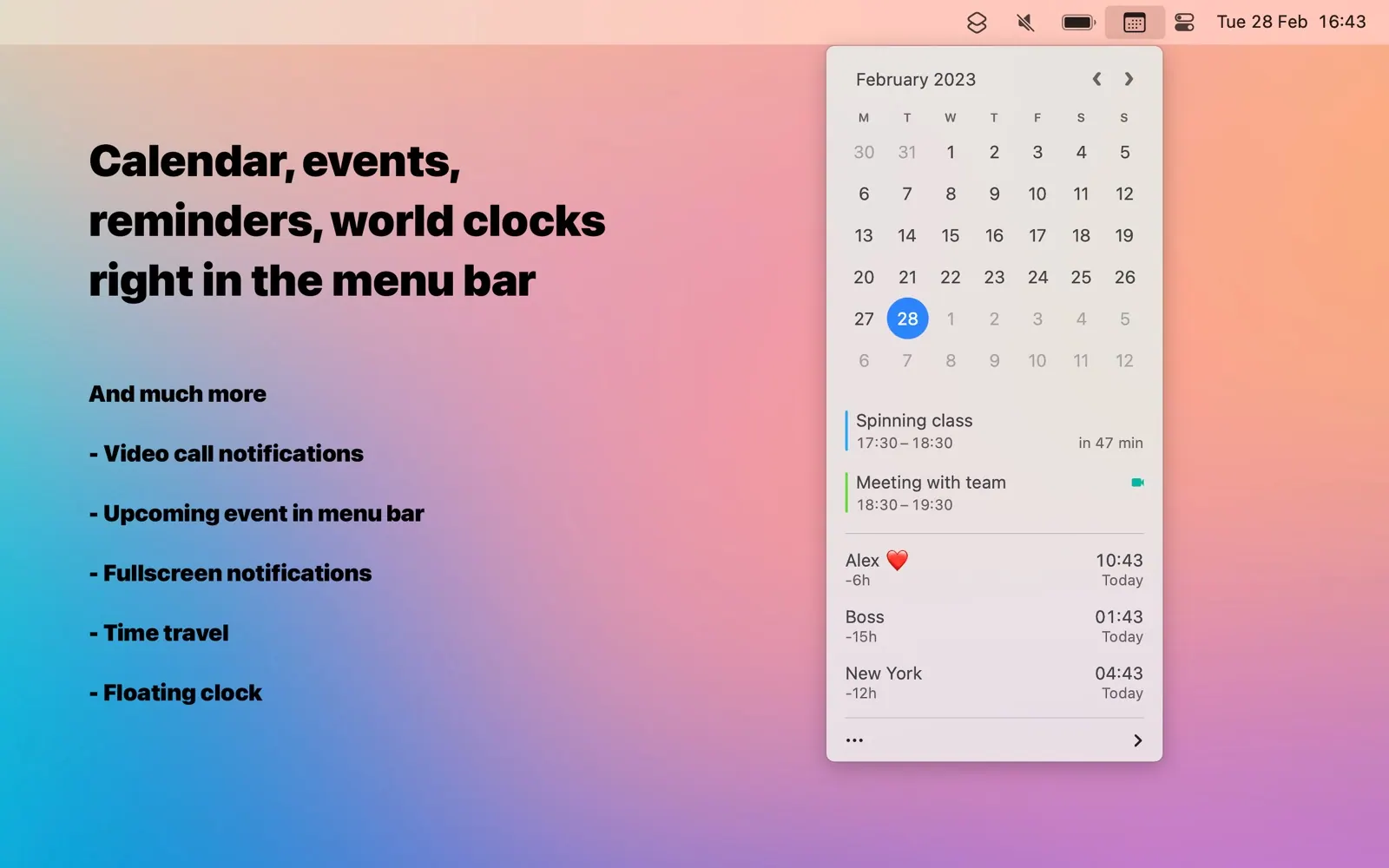
Dato by Sindre Sorhus is a better menu bar clock. Click it and you see upcoming events, a calendar, and as many time zones as you set up. Meeting links get a join button, which saves digging through invites. It is a one-time purchase.
Fantastical
Fantastical is a full calendar app, but its menu bar mini window is the part many people use most. You type events in plain English ("lunch with Sam Friday 1pm") and it fills in the details. The basic version is free; the full feature set is a subscription.
Keep the Mac awake
Amphetamine is free and very flexible. You can keep the Mac awake for a fixed time, while a specific app runs, or until a download finishes. Lungo is the minimal alternative: one click, a few preset durations, a keyboard shortcut. We cover both, plus the built-in Terminal command, in how to keep your Mac awake.
Before a video call
Hand Mirror opens a small camera preview from the menu bar so you can check your hair, lighting and background before joining. It works with any webcam, and you can pin the window while you get ready. The core feature is free.
Quick notes and a drawer
Tot holds seven notes, one per coloured dot, and nothing more. That limit is the point: it is a scratchpad, not a notes system. The Mac app is free.
Unclutter takes a different approach. Scroll down at the top of the screen and a drawer opens with quick notes, a file shelf and your clipboard history side by side. It is a one-time purchase of $19.99.
Focus timers
Flow is a Pomodoro timer that lives in the menu bar and can hide distracting apps while you work. Session adds an intention for each session and weekly reports of where your time went. Both have free tiers.
Small pleasures
Klack plays mechanical keyboard sounds as you type, with several switch profiles and per-app muting. It costs $4.99 and does nothing useful, which is fine. Some people find it makes long writing sessions more enjoyable.
Links and browsers
Velja picks a browser for each link. Set rules per app or per website, so Slack links open in your work browser and everything else in your personal one. Meeting links can open directly in Zoom or Teams instead of a browser tab.
Hide the rest
Every app above adds an icon. On a MacBook with a notch, icons that do not fit just disappear. Two free, open-source fixes:
- Hidden Bar puts an arrow in the menu bar. Icons to the left of it are hidden until you click.
- Ice can hide items, show them in a separate bar, and search them.
macOS Tahoe also lets you switch off third-party menu bar items in System Settings, under Menu Bar. Details are in how to hide menu bar icons on a Mac.
What makes a good menu bar app
A menu bar app is always running, so the bar for keeping one is higher than for a normal app. We look for a few things:
- It opens instantly when clicked. A menu bar window that takes a second to appear defeats the point.
- It uses little memory and energy when idle. Activity Monitor's Energy tab shows which apps keep waking the Mac.
- It has a keyboard shortcut, so you can reach it without the mouse.
- Its icon is quiet. Animated or colourful icons pull your attention every time you look up.
- It can hide its own icon, or works well with a menu bar manager.
Apps that fail more than one of these usually do not last a month on our Macs.
A sensible starter set
If you want a short list, we would start with Dato, Amphetamine and Hidden Bar, then add Hand Mirror if you are on calls a lot. That is four icons, and three of them stay hidden most of the day.
For more, browse menu bar apps, the free menu bar apps and menu bar apps you pay for once.
FAQ
How many menu bar apps is too many?
When you can no longer see them all, which on a 13-inch MacBook with a notch happens surprisingly fast. Use a menu bar manager or the built-in toggles to hide what you rarely click.
Why do some menu bar icons disappear on a MacBook?
macOS does not wrap or shrink menu bar items. When the app menus on the left and the icons on the right meet the notch, the extra icons are hidden with no warning. Hiding icons you rarely use brings the others back.
Do menu bar apps slow down a Mac?
Small native ones like Dato, Lungo or Hidden Bar use very little memory. Apps that poll the network or draw graphs constantly use more. If you suspect one, check Activity Monitor's Energy tab.
Can I rearrange menu bar icons without an app?
Yes. Hold Command and drag an icon to move it. Holding Command and dragging a system icon out of the menu bar removes it.
Apps in this guide