The best writing apps for Mac, by kind of writing
Writing apps for Mac matched to the job: Ulysses for long-form, Drafts for capture, Bear and Craft for notes that grow, Day One for journaling.

Written by Mac App Index Editorial
The best writing app for Mac depends on what you write. For long-form work like articles and books, Ulysses is our pick. For quick capture, use Drafts. For notes that grow into documents, choose Bear or Craft, and for a private journal, Day One.
How we picked: we wrote real pieces in each app, from shopping lists to a 5,000-word article, and judged them on the editor, organisation, export and how quickly we could get back to where we left off.
Long-form writing
Ulysses
Ulysses keeps every sheet you write in one library, synced through iCloud across Mac, iPad and iPhone. The editor uses a Markdown-based syntax and stays out of the way. Writing goals let you set a target per sheet, such as 1,500 words, and show your progress as you type.
When a piece is done, Ulysses exports to PDF, Word, ePub and HTML, and publishes directly to WordPress and Ghost. It is a subscription, which some writers dislike, but it is the most complete long-form tool on the Mac.
Other long-form options
Two well-known apps not in our catalog:
- Scrivener, from Literature & Latte, is built for books and screenplays, with a binder for research, corkboard planning and a powerful compile step. It is a one-time purchase.
- iA Writer is a minimal Markdown editor that stores plain text files where you choose. It is a one-time purchase on the Mac.
Capture first, decide later
Drafts opens to a blank page every time. You start typing straight away, and when you are done, you send the text somewhere with an action: an email, a message, a task, a note in another app. Hundreds of community actions exist, and you can write your own in JavaScript.
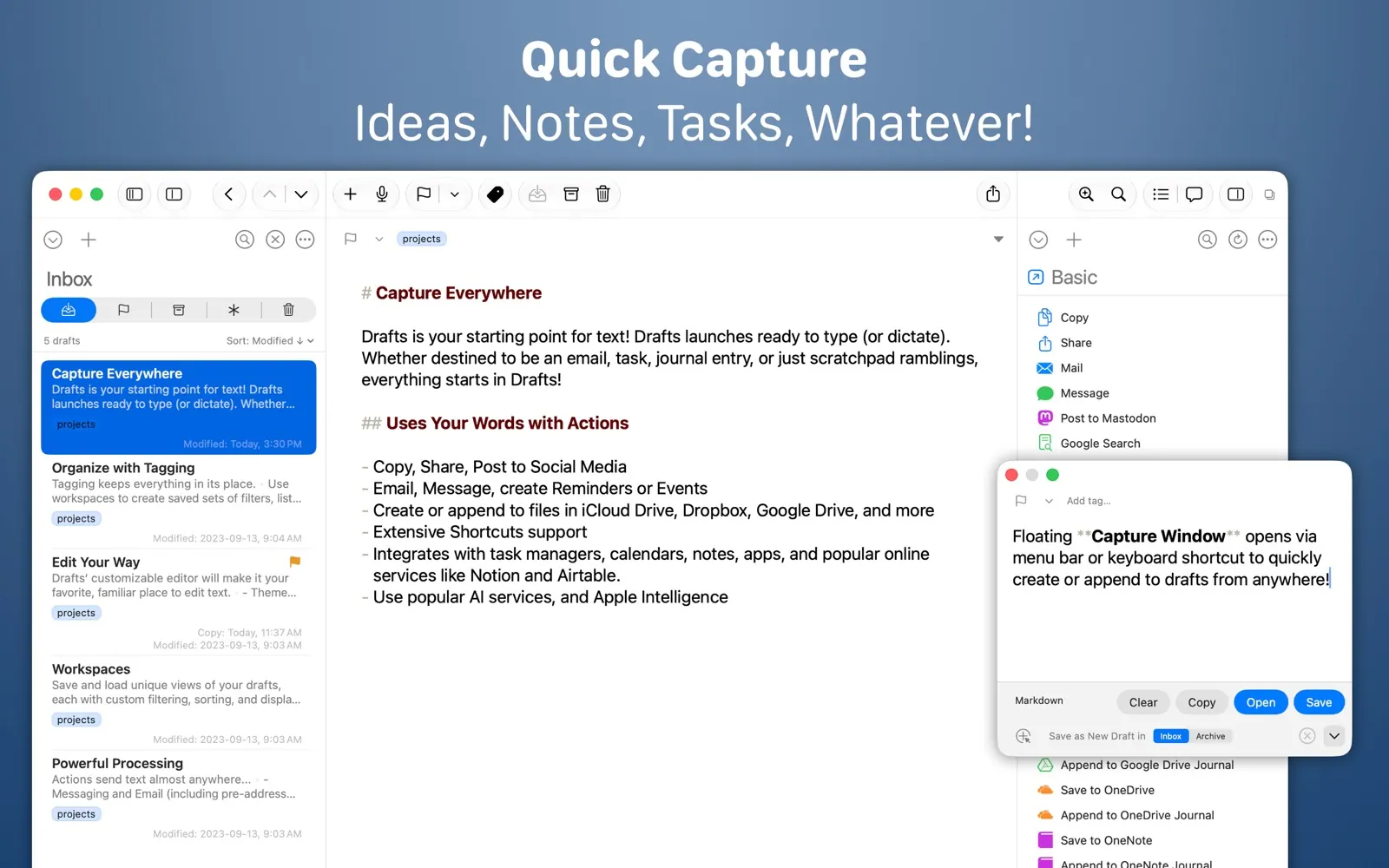
The free version covers capture. Drafts Pro adds customisation and the full automation features.
Tot is the even smaller option: seven notes in the menu bar, free on the Mac. It is a scratchpad, not a library.
Notes that grow into documents
Bear
Bear is a Markdown notes app with nested tags. Its editor shows styling as you type, so it is comfortable for both a short note and a few thousand words. Exports include PDF, HTML and more. It is free on one device; Bear Pro adds sync and encryption.
Craft
Craft works in blocks. Every paragraph can be moved, nested, or turned into its own page, and the result looks designed without effort. You can share a page as a website, which makes it good for proposals, guides and team documents. There is an AI assistant built in, a free tier and a subscription.
Journaling
Day One is a journal with photos, places, templates and prompts. Sync is end-to-end encrypted, and On This Day brings back entries from previous years. It has a free tier and a subscription for sync across devices and more storage.
Which writing app should you choose?
- Articles, essays, a blog: Ulysses.
- A novel or screenplay: Scrivener.
- Many short bits of text through the day: Drafts.
- Notes and drafts in one place, with Markdown: Bear.
- Documents other people will read: Craft.
- A private journal: Day One.
It also helps to think about where your writing lives in five years. Plain text and Markdown, as used by Drafts, Bear and Ulysses, open in almost any app. Rich formats tied to one service are harder to move.
Many writers use two: Drafts or Tot for capture, and Ulysses or Bear for anything that grows. That split keeps the main library tidy.
Publishing and sharing
Where the text ends up often decides the app. Ulysses publishes directly to WordPress and Ghost, which saves a copy-and-paste step for bloggers. Craft shares pages as websites with a link, which suits drafts for colleagues and clients. Bear and Drafts export Markdown and other formats that paste cleanly into most publishing tools. For print or Word files, Ulysses and Pages export DOCX.
Tips for writing on a Mac
- Use full screen, or tile the writing app with your research on one side.
- Turn on a Focus mode while you write, so notifications wait.
- Learn your app's Markdown shortcuts. They are faster than reaching for the mouse.
- Back up. iCloud sync is not a backup; export important work regularly or keep Time Machine running.
Browse more in writing and note apps, free writing apps and alternatives to Ulysses.
FAQ
What is the best free writing app for Mac?
Apple Pages is free and handles most documents. For Markdown writing, Bear's free version works on one device, and Drafts and Tot are free for capture.
Is Ulysses worth the subscription?
If you write long pieces regularly and value a single synced library with goals and direct publishing, yes. If you write occasionally, a one-time app like iA Writer may suit you better.
Which writing app works offline?
All of the apps here work offline on the Mac and sync when you are back online. Craft and Day One need their own sync services for multi-device use; Ulysses, Bear and Drafts sync through iCloud.
Do I need Markdown?
No, but it helps. Markdown keeps formatting simple and portable, so your text moves easily between apps. Ulysses, Bear and Drafts all use it.
Can I write a book in Ulysses?
Yes, many people do. Scrivener has more tools specifically for books, such as research folders and a corkboard, so try both if you are starting a large project.