Mac gaming in 2026: what runs and how to play it
Mac gaming in October 2026: which games run natively, how CrossOver, MaPC and Highball run Windows games, what anti-cheat blocks and which Mac to buy.

Written by Mac App Index Editorial


Mac gaming in late 2026 works better than its reputation, but the experience splits three ways. A small set of big games run natively on Apple silicon, at their best. A much larger set of Windows games run through translation tools such as CrossOver, MaPC and Highball. And a hard core of online shooters will not run locally at all.
Gaming on a Mac in 2026 is good for single-player and co-op PC games, and still poor for competitive multiplayer. Play native Mac versions first, run Windows games through CrossOver ($74 a year) or the free MaPC and Highball betas, and stream anything with kernel anti-cheat through a cloud service such as GeForce NOW.
This guide reflects what we found on 26 October 2026, from Apple's developer pages, the developers of each tool, Valve's Steam Hardware & Software Survey, MacGamesList's release tracker and independent benchmarks from Macworld and NoobFeed. Each number below names its source.
Mac gaming in 2026 at a glance
| Route | What it is | Best for | Cost |
|---|---|---|---|
| Native Mac games | Games built for macOS and Apple silicon | The best performance and battery life | The game itself |
| CrossOver | Commercial Wine-based layer from CodeWeavers | Most Windows games, with paid support | $74 for 12 months, $494 lifetime, 14-day trial |
| MaPC | Free Wine front end with a Steam, Epic and GOG library | Players who want no setup | Free; optional extras from $4.99 once |
| Highball | Free, open-source Wine app with an open compatibility database | Checking a game before a big download | Free (GPL-3) |
| Game Porting Toolkit 4 | Apple's developer kit for evaluating Windows games | Developers, and the D3DMetal layer other tools use | Free |
| Cloud gaming | Games run on remote PCs and stream to the Mac | Anti-cheat titles and older Macs | Varies by service |
What's new in Mac gaming (as of 26 October 2026)
- Game Porting Toolkit 4 was announced at WWDC on 8 June 2026. Its evaluation environment now supports Metal 4, and it adds AI agent skills and command-line Metal tools for developers, according to Apple's Game Porting Toolkit page.
- macOS 27 Golden Gate shipped on 14 September 2026, and macOS 27.0.1 followed on 28 September 2026, according to Macworld. It runs only on Apple silicon Macs.
- CrossOver 26.3 arrived on 21 July 2026. CodeWeavers has said CrossOver 27, due in early 2027, will run natively on Apple silicon and drop Intel Macs, per Macworld's CrossOver review.
- MaPC is in public beta at version 1.1.14, according to its website.
- Highball, a free successor to the archived Whisky app, is in beta with a public game database.
- Steam's September 2026 survey puts macOS at 1.92% of Steam users, down 0.22 points from the previous month.
How gaming on a Mac works in 2026
Every game on an Apple silicon Mac reaches the screen through Metal, Apple's graphics API. The route a game takes to Metal decides how well it runs.
Native games are compiled for Apple silicon and talk to Metal directly. They get the best frame rates, the best battery life and Mac features such as MetalFX upscaling.
Translated games are Windows builds that run inside a compatibility layer. Wine stands in for Windows itself. A graphics translator turns DirectX calls into Metal calls: Apple's D3DMetal (part of the Game Porting Toolkit), DXMT, or DXVK paired with MoltenVK. Rosetta 2 turns the game's Intel x86 code into Apple silicon code. Every one of these steps costs a little performance, and any of them can break a particular game.
Streamed games run on a remote PC in a data center. The Mac only decodes video and sends your inputs, so the Mac's own hardware barely matters.
One more route, a full Windows virtual machine, exists. Parallels Desktop runs the Arm version of Windows 11 in a window. It handles stubborn Windows apps well, but it is a weak gaming option: Parallels forum users still report missing DirectX 12 support on Apple silicon in early 2026, and many modern games need DirectX 12.
Native Mac games: better, but still a short list
The number of native Mac games keeps growing, but most new PC releases still skip the Mac. The clearest picture comes from MacGamesList's page of new Mac games, which lists 2025 and 2026 releases that a Mac can play and labels each with its route. On 26 October 2026 it listed 60 games. Nine ran natively on Apple silicon, one ran through Rosetta 2, and 50 played only through CrossOver.
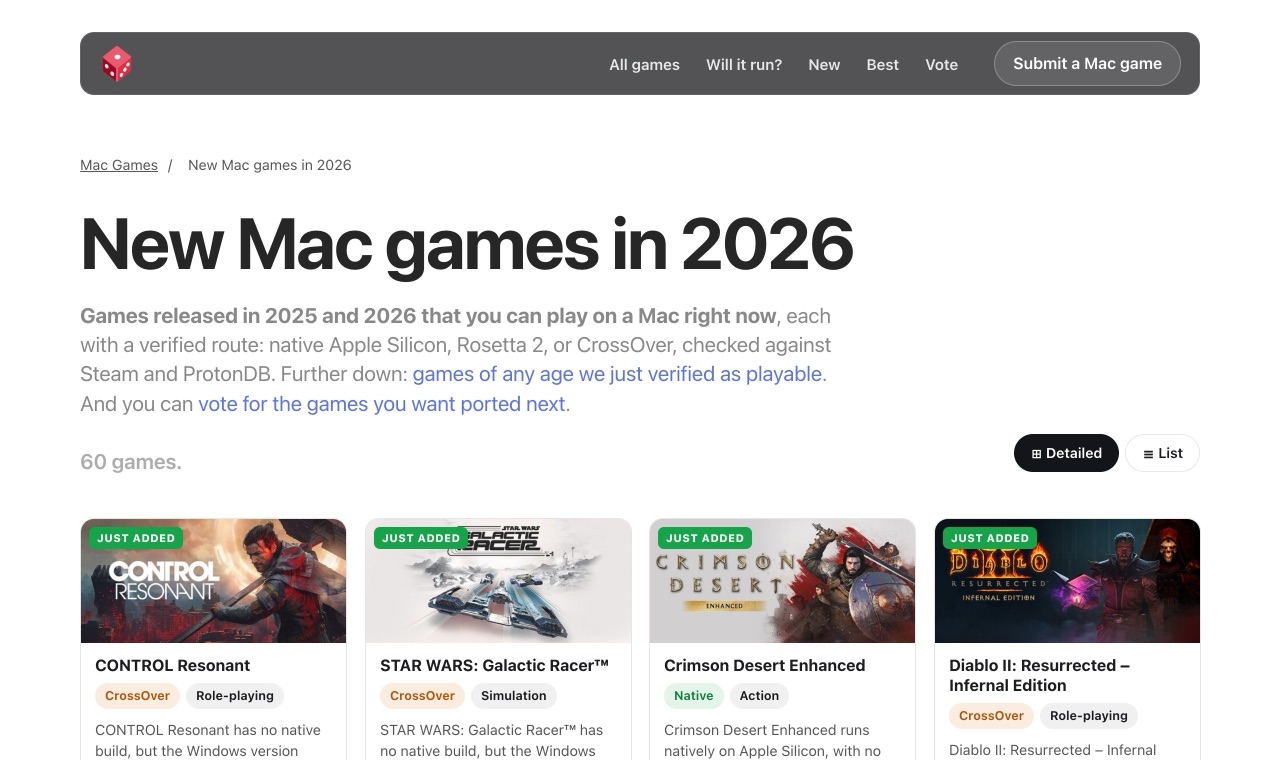 Source: MacGamesList, New Mac games in 2026, captured 26 October 2026.
The nine native games on that list were Crimson Desert Enhanced, Slay the Spire 2, Hollow Knight: Silksong, Blue Prince, Two Point Museum, 9 Kings, Big Ambitions, Sandustry and Stick It to the Stickman. Big-budget releases such as 007 First Light, Subnautica 2, Pragmata and Anno 117: Pax Romana were listed as CrossOver-only.
The showcase native port is still Cyberpunk 2077: Ultimate Edition. CD PROJEKT RED released it for Apple silicon Macs on 17 July 2025 through the Mac App Store, Steam, GOG and the Epic Games Store, as 9to5Mac reported. It needs 16GB or more of unified memory, works on every Apple silicon chip back to the M1, and runs best on macOS 15.5 or later. It supports path tracing, frame generation and HDR.
Other well-known native games include Baldur's Gate 3, Civilization VII, the Resident Evil 4 remake and Total War: Warhammer III. Indie and strategy games have the best native rate, because the engines many of them use can already export a Mac build.
Why the Mac still gets fewer ports
The Mac is a small market on Steam, the store most PC players use. In Valve's Steam Hardware & Software Survey for September 2026, Windows held 95.03% of users, Linux 3.05% and macOS 1.92%. The single most common Mac version in the survey was macOS 26.6.2, at 0.69% of all Steam users.
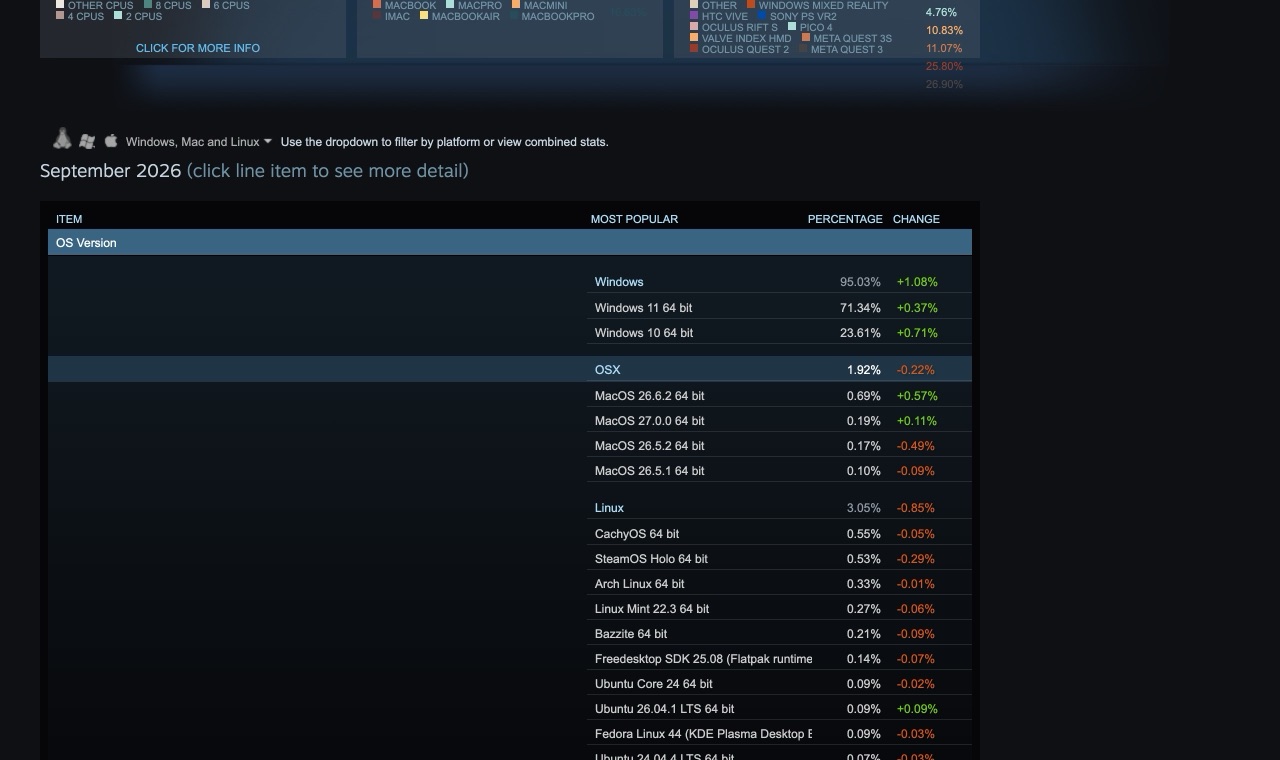 Source: Steam Hardware & Software Survey, captured 26 October 2026.
The survey is optional and counts only Steam users, so it understates people who buy games from the Mac App Store or play through the cloud. It still explains the business problem: a full port costs real money, and the Steam audience on the other side is under 2%. That is why translation tools carry most of the load.
Running Windows games on a Mac: the four tools that matter
Four tools cover almost everything a Mac player needs for Windows games. They share the same core parts (Wine, DXMT, DXVK, MoltenVK and Apple's D3DMetal) and differ in price, polish and how they help you pick games.
Apple's Game Porting Toolkit 4
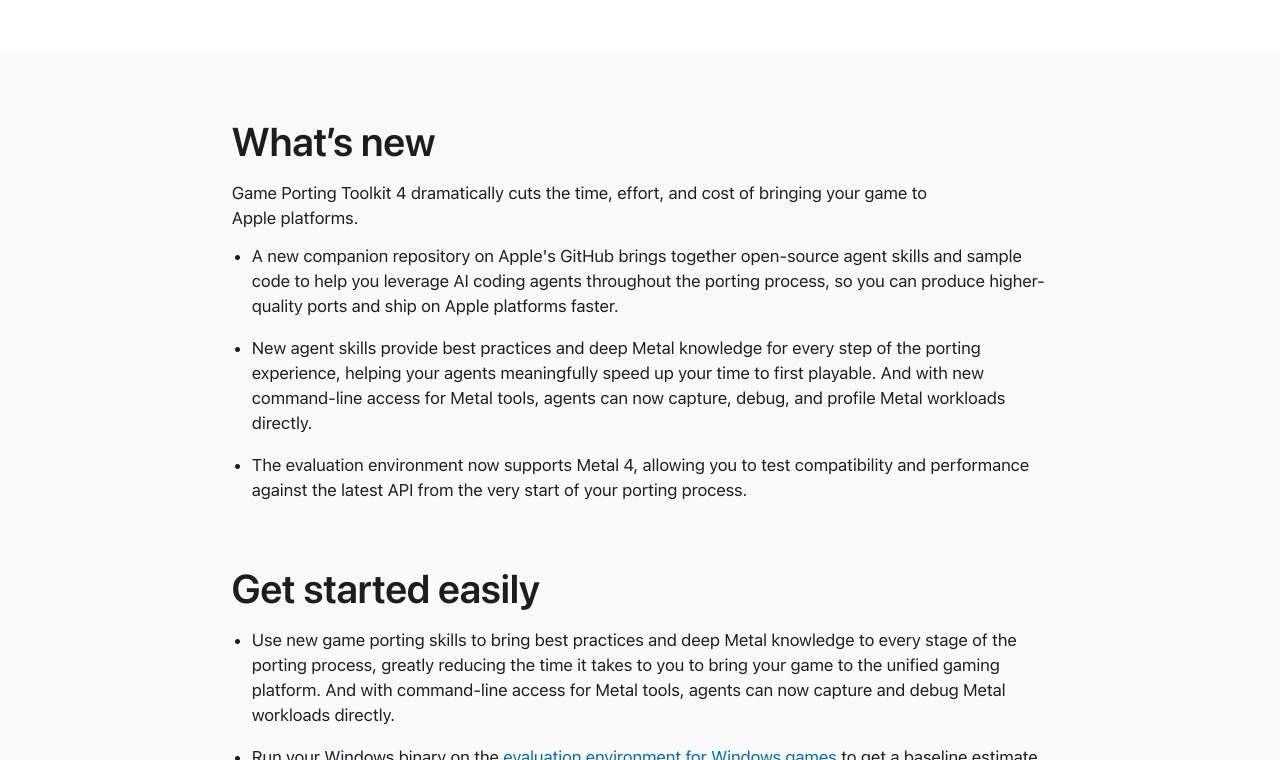
Game Porting Toolkit is Apple's kit for developers who want to bring Windows games to the Mac. Its evaluation environment runs an unmodified Windows game on Apple silicon so a studio can judge performance and check that its shaders convert. Apple ships it as a developer tool, but the D3DMetal layer inside it powers DirectX 12 support in the player tools below.
 Source: Apple Developer, Game Porting Toolkit, captured 26 October 2026.
Version 4 matters to players because of its speed. In a Macworld test published on 16 July 2026, Filipe Esposito ran GTA V on an M4 Pro MacBook Pro with 24GB of memory. It went from about 106 fps under Game Porting Toolkit 3 to about 176 fps under the version 4 beta, at the same settings. Red Dead Redemption 2 rose from about 60 fps to about 75 fps. Those numbers come from one reviewer testing a beta, and the toolkit was still in beta when this guide was written.
You do not always need to install the toolkit by hand to play. CrossOver bundles D3DMetal, and Highball downloads it once you accept Apple's license. MaPC's DirectX 12 option needs you to install the toolkit yourself.
CrossOver 26: the paid, supported option
CrossOver from CodeWeavers is the most complete way to run Windows games on a Mac, and the route trackers such as MacGamesList and AppleGamingWiki use for their compatibility labels. CrossOver 26 shipped on 10 February 2026, rebased on Wine 11.0, with D3DMetal 3.0 and DXMT 0.72, according to Phoronix. The release added support for God of War Ragnarök, Borderlands 4, HELLDIVERS 2, Age of Empires IV: Anniversary Edition, Starfield and Final Fantasy VII Rebirth.
The point releases kept going. CrossOver 26.1 in April 2026 got Diablo IV and Overwatch running on macOS Tahoe 26.5. Macworld measured Diablo IV at about 50 fps at 1920×1080 and medium settings on an M2 Pro MacBook Pro. CrossOver 26.3 followed on 21 July 2026.
On a base M5 chip, the cost of translation can be small. In NoobFeed's M5 MacBook Pro review, the native Mac version of Cyberpunk 2077 averaged 59.8 fps in its built-in benchmark at 1080p medium, and the Windows version in CrossOver 25 averaged 56.35 fps at the same settings.
One catch applies. CrossOver 26 still runs through Rosetta on Apple silicon, because its code base started on Intel. CodeWeavers says CrossOver 27, due in early 2027, will run natively on Apple silicon and will no longer support Intel Macs.
CrossOver+ costs $74 with 12 months of updates and support, and CrossOver Life costs $494, per the CodeWeavers store. A 14-day free trial runs the full version, so test your games before you pay.
MaPC: free, and built for people who never want to see Wine
MaPC is a free Mac app that connects your Steam, Epic Games and GOG libraries, lets you install a game, and launches it with suitable graphics settings. It is a public beta, at version 1.1.14 on 26 October 2026.
 Source: MaPC, captured 26 October 2026.
According to MaPC's site, the app needs:
- an Apple silicon Mac (M1 or later),
- macOS 15 or later,
- Rosetta 2 (MaPC offers to install it),
- about 30 GB free for the engine and games.
DirectX 9 runs through Wine's own Direct3D, and DirectX 10 and 11 run through DXVK or DXMT on Metal. DirectX 12 games work only through an experimental option that needs Apple's Game Porting Toolkit, which MaPC does not include. Each game keeps its own settings for the graphics backend, ray tracing, MetalFX upscaling and launch options. The app collects no telemetry and keeps store logins on the Mac.
Everything that runs games is free. A one-time payment (pay what you like from $4.99, with $14.99 and $29.99 tiers) unlocks extras such as save backup to iCloud Drive, playtime stats, a performance HUD and Retina resolution. Ubisoft Connect and the EA app are not supported yet.
Highball: the open-source successor to Whisky
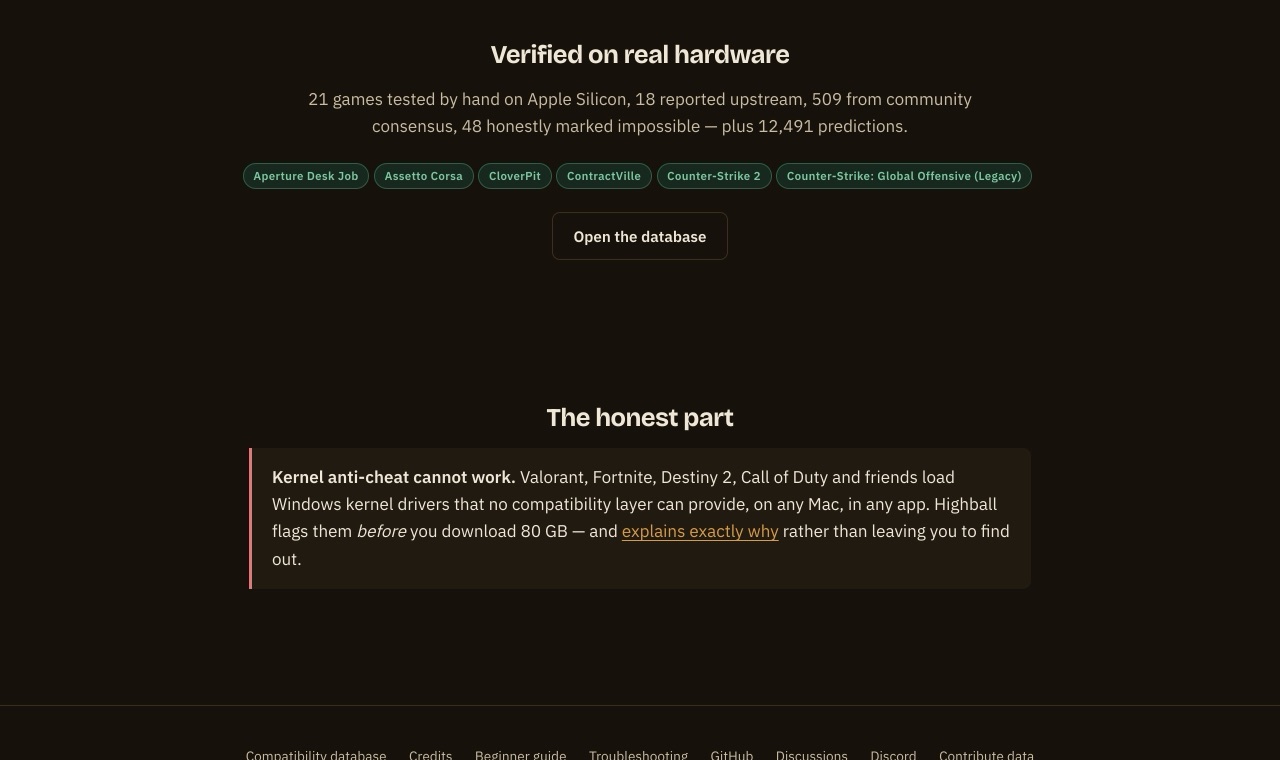
Highball is a free, GPL-3 app that installs a Wine engine for you, sets up Windows Steam in one click and connects your Epic library through the open-source Legendary client. Its main feature is the database: every game carries a verdict of verified, reported, predicted or blocked, with the source and date of each claim.
 Source: Highball, captured 26 October 2026.
On 26 October 2026, Highball's site counted 21 games tested by hand on Apple silicon, 18 reported upstream, 509 from community consensus and 48 marked impossible, plus 12,491 predictions. Some entries carry a fix the app can apply for you: Portal 2 froze on every map load until the team traced it to a MoltenVK bug, and with the fix applied it runs at 210 fps.
Highball needs an Apple silicon Mac with macOS 14 or later, according to Korben. It does not bundle D3DMetal, so DirectX 12 games need you to accept Apple's Game Porting Toolkit license first. It has no account and no telemetry. Engines are pinned by hash, and you can switch between a community Wine 10 build and Highball's own Wine 11 build made from CrossOver's published source.
What happened to Whisky
Whisky, the free SwiftUI wrapper many Mac players started with, is finished. Its GitHub repository was archived on 11 May 2025 and is read-only. Community forks exist, but they are not official releases. If you still use Whisky, move your games to Highball, MaPC or CrossOver.
The hard limit: multiplayer and anti-cheat
Kernel-level anti-cheat is the biggest gap in Mac gaming, and no translation tool can close it. Highball's site puts it plainly: "Kernel anti-cheat cannot work." Valorant, Fortnite, Destiny 2 and Call of Duty load Windows kernel drivers that Wine cannot provide on any Mac. MaPC's site gives the same warning for Fortnite, Valorant and many games that use Easy Anti-Cheat or BattlEye.
Some online games do work. Games whose anti-cheat stays out of the Windows kernel, or whose developers enabled Wine and Proton support, can run in CrossOver and the free tools. Counter-Strike 2, which has no Mac version, is one of the games Highball lists as tested by hand on Apple silicon. Check before you buy. Highball flags blocked games before you start a download, and its site points out that a blocked game can be an 80 GB mistake.
Cloud gaming fills the gaps
Cloud gaming is the only way to play most kernel anti-cheat games on a Mac, and it is the best option for older Macs. The game runs on a remote PC with an Nvidia graphics card, and your Mac plays a video stream.
GeForce NOW's system requirements are light on the Mac side: macOS 10.15 or later on any Mac from 2009 or later. The network matters far more. Nvidia asks for:
- 15 Mbps for 720p at up to 60 fps,
- 25 Mbps for 1080p at 60 fps,
- 45 Mbps for 4K at 120 fps,
- less than 80 ms of latency to an Nvidia data center.
Nvidia recommends a wired Ethernet connection or a 5 GHz Wi-Fi router. Streaming at 4K, 5K or ultrawide resolutions needs a Premium membership. Cloud gaming also depends on the service: a game is playable only if the publisher allows it on that platform, and you usually still buy the game on Steam or another PC store.
Which Mac is best for gaming in 2026
The best Mac for gaming in 2026 is one with an M5 Pro or M5 Max chip, at least 24GB of memory and a fan. The GPU core count matters most, followed by memory and cooling.
Apple announced the M5 Pro and M5 Max MacBook Pro on 3 March 2026, with sales starting on 11 March 2026, according to Apple's newsroom. Apple's figures:
| Chip | GPU cores | Max memory | Memory bandwidth | Graphics vs previous generation |
|---|---|---|---|---|
| M5 Pro | up to 20 | 64GB | up to 307GB/s | up to 20% faster than M4 Pro; up to 35% faster in ray tracing |
| M5 Max | up to 40 | 128GB | up to 614GB/s | up to 20% faster than M4 Max; up to 30% faster in ray tracing |
Each GPU core in both chips has a Neural Accelerator.
The base M5 is a capable entry point. NoobFeed's review of the base M5 MacBook Pro ($1,599 with a 10-core GPU, 16GB of memory and a 512GB SSD) measured Death Stranding at 70 to 90 fps at 1080p with upscaling, Metro Exodus at 60 to 80 fps at 1080p, and Stray at 50 to 60 fps at 1080p high. Its conclusion: native and translated games run smoothly if you keep resolutions low and leave ray tracing off.
Three practical rules for buying a Mac for gaming:
- Get at least 16GB of memory, because Cyberpunk 2077 will not run on less. Translated games use more memory than native ones, since Wine and the graphics layer need room too, so 24GB or more is a better target.
- Plan for storage. MaPC alone asks for about 30 GB for its engine and games, and big titles run to 80 GB or more. A 512GB Mac fills quickly; an external Thunderbolt or USB SSD is a cheap fix for a game library.
- Pick a Mac with a fan for long sessions. In NoobFeed's tests, the M5 MacBook Pro kept 90.4% of its performance through 3DMark's Wild Life Extreme stress test, and its fans ran at 38 to 42 dB during a 30-minute Heaven run. A fanless MacBook Air slows down in long sessions, so it suits indie games and cloud gaming better than demanding releases.
Settings that help on any Mac
macOS has a few built-in features for games, and the tools above add more.
Game Mode turns on by itself when a game enters full screen, according to Apple Support. It gives the game top priority on the CPU and GPU, lowers background activity, and doubles the Bluetooth sampling rate to cut input and audio lag for wireless controllers and AirPods. It needs an Apple silicon Mac with macOS Sonoma 14 or later, and a game that supports macOS full-screen mode.
Game Overlay in macOS Tahoe opens with Command-Esc while a game is full screen. From there you can turn Game Mode off for a single game; it stays off for that game until you turn it back on.
MetalFX upscaling renders the game at a lower resolution and scales it up, trading a little sharpness for a higher frame rate. Native games such as Cyberpunk 2077 include it, and MaPC exposes it as a per-game setting for translated games.
Xbox and PlayStation wireless controllers pair over Bluetooth in System Settings, and Game Mode's faster Bluetooth sampling applies to them.
Mac apps that make gaming better
A few everyday Mac apps solve problems that come up the moment you start gaming on a Mac. All of them are listed on Mac App Index with their prices.
- Discord (free, with in-app purchases) is where most PC gaming groups talk. It runs natively on the Mac, so voice chat does not compete with a translated game for Wine resources.
- OBS Studio (free, open source) records and streams gameplay from native and translated games alike.
- Stats (free) or iStat Menus ($11.99) show CPU, GPU and memory use in the menu bar. Watch them during a session to see whether a game is limited by the GPU, by memory or by heat.
- DaisyDisk ($9.99) shows what fills your drive, which helps once Wine engines, shader caches and 80 GB installs start piling up.
- Amphetamine (free) keeps the Mac awake through a long download or a cloud session. MaPC sells a keep-awake option as a paid extra; Amphetamine does it for every app. Our guide on how to keep your Mac awake covers the built-in options too.
Where Mac gaming goes next
The next big change for Mac gaming is the move away from Rosetta. MaPC's site notes that Apple has said macOS 27 is the last release with full Rosetta support, and Macworld's CrossOver review describes a similar timeline. Every translation tool on this page depends on Rosetta today. CrossOver 27, due in early 2027, is the first major tool scheduled to run natively on Apple silicon, and MaPC says its engine is built to be swapped out.
The other change is on the developer side. Game Porting Toolkit 4 targets the slow, expensive work of a full port, and Apple pitches it as a way to bring games to Mac, iPad and iPhone together. The release lists over the next year will show whether that produces more native ports. Until then, buy the native Mac version of a game when one exists, run the rest of your Windows library through CrossOver, MaPC or Highball, and stream anything protected by kernel anti-cheat.
Key takeaways
- In Steam's September 2026 survey, macOS ran on 1.92% of Steam users' machines, which is why most new PC games still skip a native Mac version.
- Of 60 new 2025 and 2026 games MacGamesList tracked on 26 October 2026, nine ran natively on Apple silicon and 50 played only through CrossOver.
- CrossOver costs $74 for a year of updates, while MaPC and Highball run Windows games for free in public beta.
- Games with kernel anti-cheat, such as Valorant, Fortnite, Destiny 2 and Call of Duty, cannot run on a Mac through any compatibility layer.
- An M5 Pro or M5 Max Mac with 24GB of memory or more and a fan gives the best sustained gaming performance in 2026.
FAQ
Can you play Windows games on a Mac in 2026?
Yes, many of them. CrossOver, MaPC and Highball run Windows games on Apple silicon Macs by translating Windows and DirectX calls to macOS and Metal, and most single-player games work. Games with kernel-level anti-cheat do not, and some games need per-game fixes. Check Highball's database or the CrossOver compatibility list before you buy.
Can a Mac run Valorant or Fortnite?
No, not locally. Valorant and Fortnite use kernel-level anti-cheat that loads Windows drivers, which no Mac compatibility layer can provide. The practical way to play them on a Mac is a cloud gaming service, where the game runs on a remote PC and streams to the Mac.
Is CrossOver worth paying for when MaPC and Highball are free?
Yes, if you play a lot of Windows games or need DirectX 12 without extra setup. CrossOver bundles Apple's D3DMetal, is the route most Mac game trackers test against and includes support, for $74 a year after a 14-day free trial. MaPC and Highball are free betas that suit players with DirectX 9 to 11 games, or anyone who wants to test a library first.
How much memory does a Mac need for gaming?
16GB is the minimum, and 24GB or more is the better target. Cyberpunk 2077 requires 16GB of unified memory on a Mac, and translated Windows games need extra room for Wine and the graphics translation layer running alongside the game.
For the rest of your setup, browse the utilities category on Mac App Index.