Xcode 27.2 adds touch testing and a JSON project format
Xcode 27.2, released 29 October 2026, adds touch input testing on MacBook Pro, a JSON-based project format and Swift 6.4. It needs macOS Tahoe 26.6.

Written by Mac App Index Editorial
Apple released Xcode 27.2 (build 27B52), the free IDE for Apple platforms, on 29 October 2026, according to the Apple Developer releases page. It ships with Swift 6.4 and SDKs for iOS 27.2, iPadOS 27.2, tvOS 27.2, watchOS 27.2, macOS 27.2 and visionOS 27.2. It follows Xcode 27.1 of 15 October 2026, which added iPhone Duo development support.
Xcode 27.2, Apple's free developer IDE for the Mac, adds touch input testing in Previews and Device Hub for MacBook Pro with PROLED XDR Display, a JSON-based project format, and a code coverage tool for coding agents. It requires macOS Tahoe 26.6 or later and a Mac with an M1 chip or later.
What's new in Xcode 27.2
Touch testing is the headline change. Device Hub now sends touches on an iPad screen (used through Sidecar) or on a MacBook with Touch to the remote device as touches, so you can test multi-finger gestures such as pinch and rotate. Apple's release notes describe the Device Hub change; the Mac App Store listing adds that Previews also respond to real touch input.
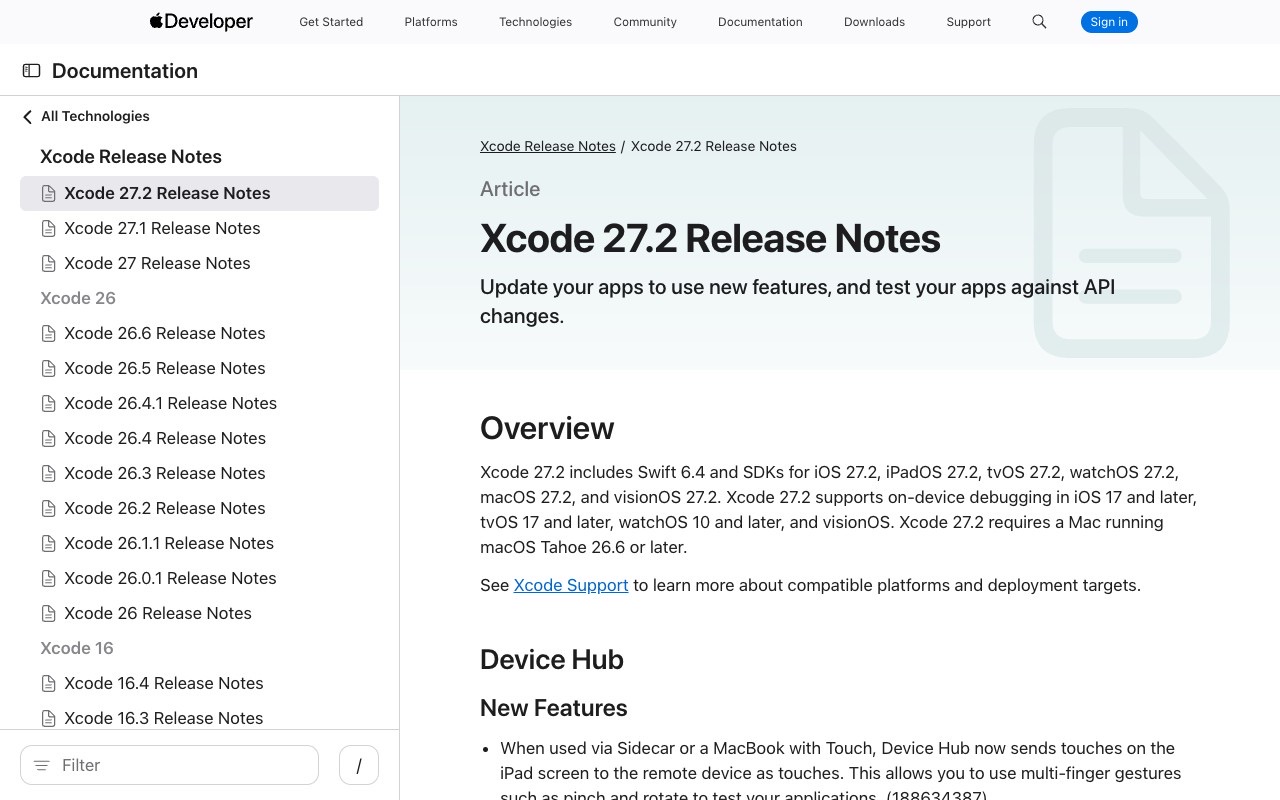 Source: Xcode 27.2 Release Notes, captured 31 October 2026.
- Project format: Xcode can now use a JSON-based project format (
.xcproj) that Apple calls more readable, merge-friendly and easier for coding agents to edit. You switch it on in the File inspector, and projects that use it still open in earlier versions of Xcode 27. - Agent tooling: the listing says Xcode adds a code coverage tool for coding agents. The release notes add that the RenderPreview MCP tool now returns the available render destinations and lets the caller pick one.
- Device Hub on simulators: slow-motion animation, simulated shake, simulated fall and simulated memory pressure, plus input support for iOS 17.x simulator runtimes, an option to hide device bezels, and Standby support in iPhone Duo.
- Fixes: Previews no longer fail in source files with Windows-style (CRLF) line endings, and a clearer error appears when another user account on the Mac owns the Previews JIT directory.
- Known issues: the macOS, watchOS, tvOS and visionOS SDKs wrongly report 27.1 as a valid deployment target. Projects using iOS 27.1 APIs show compile errors when building for Mac Catalyst, and Apple suggests wrapping that code in
#if !targetEnvironment(macCatalyst). Cloning a simulator running the 27.2 runtime might fail because of file permissions.
At a glance
| Detail | Xcode 27.2 |
|---|---|
| Version | 27.2 (build 27B52) |
| Released | 29 October 2026 |
| Price | Free |
| Swift | 6.4 |
| Requires | macOS Tahoe 26.6 or later, Mac with Apple M1 chip or later |
| Size | 3.1 GB (Mac App Store listing) |
| Where to get it | Mac App Store and Apple Developer downloads |
What it means for Mac users
If you build Mac or iPad apps, 27.2 is the first Xcode that lets you test touch on the Mac itself. Apple's SDK and system requirements page lists macOS Tahoe 26.6 or later for Xcode 27.2, so a Mac still on macOS Sequoia cannot install it.
The JSON project format is the change most teams will feel in daily work. Merge-friendly project files matter when two people edit the same project, and a Git client such as Fork is where those conflicts show up. If you edit code outside Xcode, Zed and Visual Studio Code are the listed editors, though building and signing an Apple-platform app still goes through Xcode. Xcode, Zed, Visual Studio Code and Fork are all listed on Mac App Index with their prices and macOS requirements.
What to watch
Apple lists the deployment-target reporting error and the Mac Catalyst compile errors as known issues in 27.2 and gives no fix date. Check them before moving a project that targets Mac Catalyst.
Key takeaways
- Apple released Xcode 27.2 (27B52) on 29 October 2026 with Swift 6.4.
- Device Hub sends iPad touches over Sidecar, or touches on a MacBook with Touch, to the target device as touches.
- A JSON-based
.xcprojproject format is available, and projects using it open in earlier Xcode 27 versions. - Xcode 27.2 requires macOS Tahoe 26.6 or later and an M1 Mac or newer.
- Known issues include a wrong 27.1 deployment target and Mac Catalyst compile errors with iOS 27.1 APIs.
FAQ
Is Xcode 27.2 free?
Yes. The Mac App Store lists Xcode as free, and a free Apple Account is enough to test on a device. Submitting apps to the App Store requires membership in the Apple Developer Program.
Do I need a touchscreen MacBook Pro to test touch in Xcode 27.2?
No. Apple's release notes say Device Hub sends touches through Sidecar as well as from a MacBook with Touch, so an iPad connected over Sidecar works for multi-finger gestures such as pinch and rotate.
Does Xcode 27.2 run on macOS Sequoia?
No. Apple lists macOS Tahoe 26.6 or later as the minimum for Xcode 27.2, and the Mac App Store listing also requires a Mac with an Apple M1 chip or later.
Source: Xcode 27.2 Release Notes
Browse more tools in the Developer tools category.