macOS 27.3 beta 2 lets you limit Full Disk Access
Apple's macOS 27.3 beta 2, released 16 November 2026, lets users limit Full Disk Access to chosen folders and splits Device Control into two settings.

Written by Mac App Index Editorial
macOS 27.3 beta 2 changes how apps ask for deep access
Apple released macOS 27.3 beta 2 to developers on 16 November 2026 and published a developer post the same day about new controls for two privacy permissions: Device Control and Data Access, and Full Disk Access. According to 9to5Mac, Apple announced its plan to tighten Full Disk Access in October.
macOS 27.3 beta 2, released to developers by Apple on 16 November 2026, lets you limit some apps to chosen folders or apps instead of granting Full Disk Access. Apple also splits Device Control and Data Access into two settings, and permissions already granted stay in effect.
What's new in macOS 27.3 beta 2
Apple's developer post lists six changes. Apple's own summary of the reason: "Before granting an app such extraordinary access, users should understand that it puts all of the data on their Mac at risk."
- Device Control and Data Access becomes two settings: System & App Protection Override and Accessibility.
- You grant permission one way, by selecting the requesting app from a list.
- The prompt steers you toward specific apps (for System & App Protection Override) or specific folders (for Full Disk Access) instead of everything.
- The prompt spells out the range of data an app can reach or control if you grant full permissions.
- You can set an app to ask every time it needs access.
- A transparency indicator appears when an app is controlling another app through System & App Protection Override.
 Source: Apple Developer News, captured 17 November 2026.
Apple's support document, also dated 16 November 2026, shows the new prompt. It offers Choose Folder or Choose Apps, and a separate Bypass System Protections button for people who want to grant full access. For System & App Protection Override, a menu next to each app sets Ask First or At Any Time.
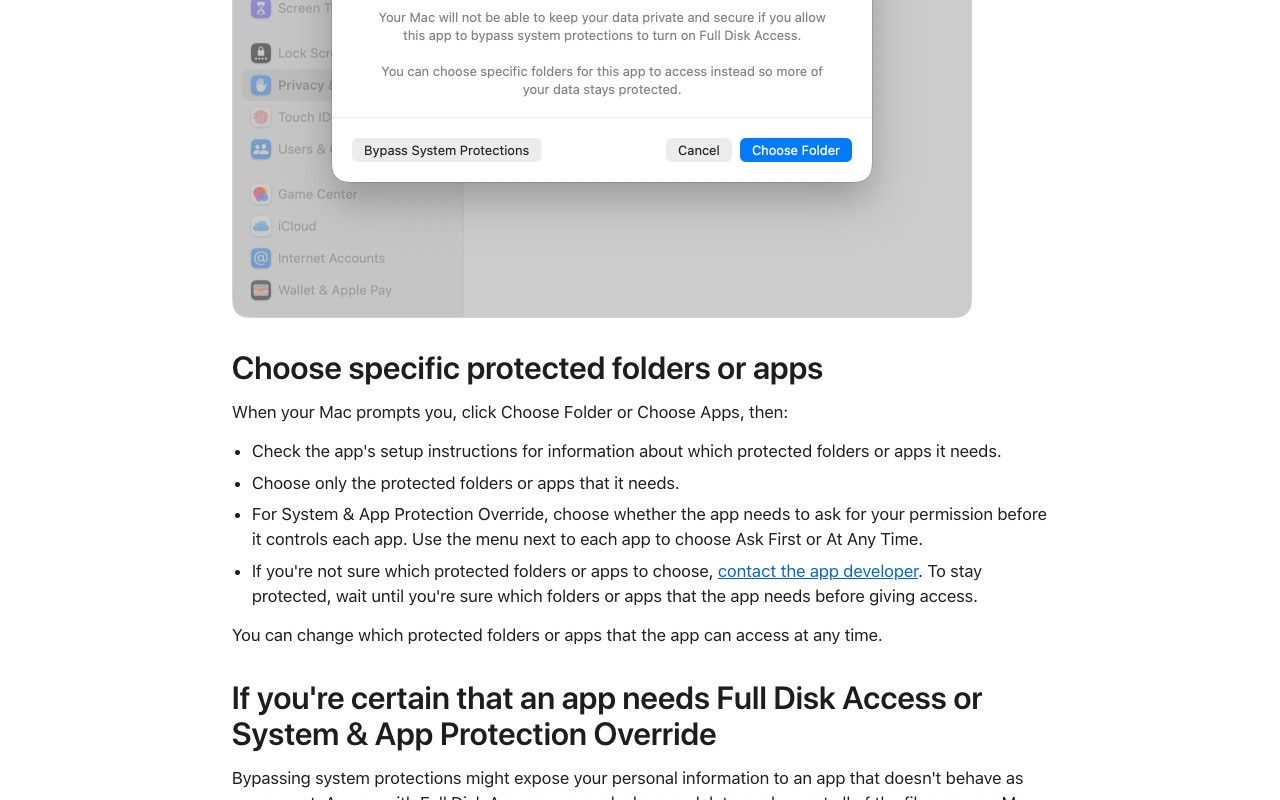 Source: Apple Support, captured 17 November 2026.
Full Disk Access stays. The support document says that if you click Bypass System Protections, an app with Full Disk Access can read, change, delete and export all of the files on your Mac. An app with System & App Protection Override can fully control your Mac and apps, see every window and capture every keystroke.
Developers get a warning. Apple says apps should be ready to handle access to only a limited set of folders or apps. Developers of backup apps and assistive technologies can request entitlements that keep the earlier experience for new installs, and Apple says additional entitlement details will be available soon.
At a glance
| Item | Detail |
|---|---|
| Release | macOS 27.3 beta 2, a developer beta |
| Date | 16 November 2026 |
| Setting split | Device Control and Data Access into System & App Protection Override and Accessibility |
| Existing permissions | All previously granted permissions remain in effect |
| Where you manage it | System Settings, Privacy & Security, under Files & Folders, Full Disk Access or System & App Protection Override |
| Entitlements | Backup and assistive technology developers can request them; details to follow |
| Apple documents | Developer post and support article |
What it means for Mac users
If you run utilities that ask for deep access, expect a different prompt after you install macOS 27.3. Apple lists backup apps, disk cleaners, file indexers and security apps as the kinds of apps that might ask for Full Disk Access or System & App Protection Override. Mac App Index lists apps in those areas, including CleanMyMac, a disk cleaner, LuLu, a firewall, and DaisyDisk, which maps what fills your disk. Apple's pages name no specific app. Apple says only that known backup and assistive apps keep their current experience without an entitlement.
Automation and gesture tools are the other group to watch. If you use something like BetterTouchTool, check which of the two settings it asks for once you update, and whether you can scope it to specific apps. All four apps are listed on Mac App Index with their prices and macOS requirements.
Nothing changes for apps you already approved. MacStories, in its take on the beta, argued that people who want to give an app full access can still click through, while others get a native way to scope that access to specific folders.
What to watch
macOS 27.3 is still in beta, and the pages I read give no release date for it. Apple says entitlement details are coming. MacStories noted that the new settings only help if the companies behind agent-style apps support them, so the first third-party updates that handle limited access will show how well the prompt works.
Key takeaways
- Apple shipped macOS 27.3 beta 2 to developers on 16 November 2026 with new Full Disk Access and Device Control prompts.
- Device Control and Data Access is now two settings: System & App Protection Override and Accessibility.
- You can limit an app to chosen folders or apps, or set it to ask every time.
- Full Disk Access is not removed, and permissions already granted stay in effect.
- Backup and assistive technology developers can request entitlements to keep the earlier experience for new installs.
FAQ
Is Full Disk Access going away in macOS 27.3?
No. Apple's support document says you can still give an app Full Disk Access by clicking Bypass System Protections, then confirming each action and entering your password. What changes is the prompt, which now explains the risk and offers a narrower choice.
Will apps I already approved lose their access?
No. Apple's developer post says all app permissions previously granted by users remain in effect. The new prompts appear when you approve new permission requests.
What is System & App Protection Override?
It is one of the two settings that replace Device Control and Data Access, with Accessibility as the other. Apple's support document says you can choose specific apps for an app to control, and set Ask First or At Any Time for each.
Can developers keep the earlier experience?
Some can. Apple says developers of apps that use Full Disk Access for disk backup, or the new Accessibility settings for assistive technologies, can request entitlements for new installations. Apple has not yet published the entitlement details.
Source: Apple Developer News
For more utilities that guard your files and network, see the Security & privacy apps on Mac App Index.