Hidden Bar 1.13.0 adds reveal gestures and icon search
Hidden Bar 1.13.0 adds scroll and shake reveal, a hidden-icon search and a presentation mode for macOS 27 that hides third-party menu bar icons.

Written by Mac App Index Editorial



Hidden Bar 1.13.0 adds four opt-in ways to control menu bar icons
Dwarves Foundation released Hidden Bar 1.13.0 on 16 November 2026. Hidden Bar is the free, MIT-licensed menu bar utility that tucks icons behind an arrow. The release also folds in 1.12.0, which the developer never shipped separately.
Hidden Bar 1.13.0 adds four opt-in features on 16 November 2026: scroll, click or shake reveal gestures, a search for hidden icons, a prompt for new menu bar apps, and a presentation mode. Three of them need the direct build on macOS 27. With every default left alone, the app behaves like 1.12.0.
What's new in Hidden Bar 1.13.0
The release notes list four additions, all off or set to the old behavior by default.
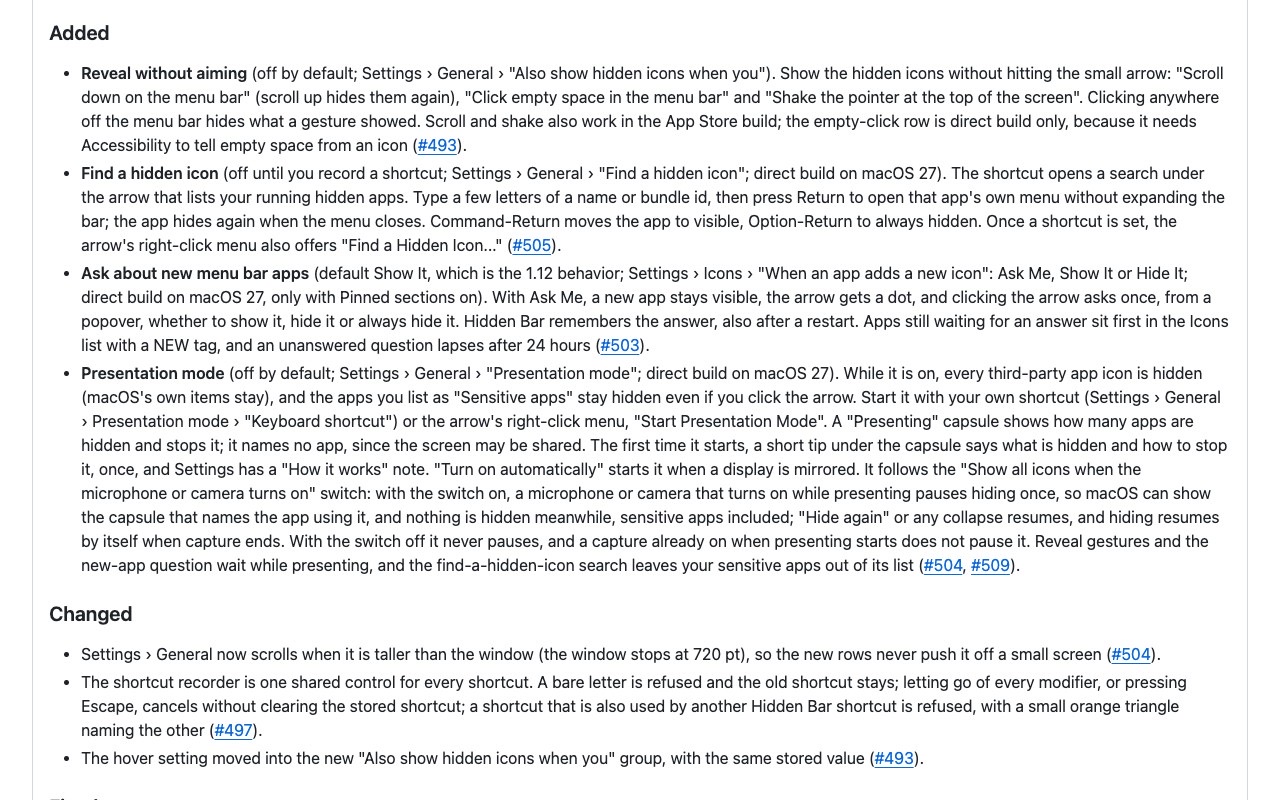
- Reveal without aiming. Under Settings › General › "Also show hidden icons when you", you can show hidden icons by scrolling down on the menu bar (scrolling up hides them), by clicking empty space in the menu bar, or by shaking the pointer at the top of the screen. Clicking anywhere off the menu bar hides them again. Scroll and shake also work in the App Store build. The empty-space click is direct build only, because it needs Accessibility to tell empty space from an icon.
- Find a hidden icon. Once you record a shortcut, it opens a search under the arrow that lists your running hidden apps. Type a few letters of a name or bundle id and press Return to open that app's own menu without expanding the bar. Command-Return moves the app to visible, and Option-Return moves it to always hidden. This is direct build only, on macOS 27.
- Ask about new menu bar apps. Under Settings › Icons › "When an app adds a new icon" you can pick Ask Me, Show It or Hide It. Show It, the default, is the 1.12 behavior. With Ask Me, a new app stays visible, the arrow gets a dot, and clicking the arrow asks once whether to show it, hide it or always hide it. An unanswered question lapses after 24 hours. Direct build, macOS 27, and Pinned sections must be on.
- Presentation mode. While it runs, every third-party app icon is hidden, and apps you list as "Sensitive apps" stay hidden even if you click the arrow. macOS's own items stay. A "Presenting" capsule shows how many apps are hidden and stops the mode, without naming any app, since the screen may be shared. "Turn on automatically" starts it when a display is mirrored. Direct build, macOS 27.
 Source: Hidden Bar v1.13.0 release notes, captured 16 November 2026.
None of the new features asks for a new permission. The notes say they use the Accessibility permission that hiding already needs, plus the pointer and scroll monitors that hover-to-expand uses, and that they never read your screen.
The release also fixes a microphone problem. An app that is capturing the microphone or system audio no longer stops the bar from collapsing (issues #477, #478 and #469). The bundled 1.12.0 notes describe the earlier version of this bug: apps that keep the microphone open, such as Wispr Flow, Krisp, Discord and dictation tools, stopped the bar from hiding. Hidden Bar now expands once when a microphone or camera turns on, and a checkbox in Settings turns that off.
Other changes carried in from 1.12.0:
- A redesigned Settings window with General, Appearance, Advanced and About tabs, and a status card that says whether Hidden Bar is working.
- Pinned sections (beta) on macOS 27, so each app keeps the section you gave it after a restart.
- Shift-click on the arrow expands the full menu bar for one expansion.
- Switching from the App Store build to the direct build offers to import your settings.
At a glance
| Item | Detail |
|---|---|
| App | Hidden Bar |
| Developer | Dwarves Foundation |
| Version | 1.13.0 |
| Release date | 16 November 2026 |
| Price | Free (Mac App Store listing) |
| License | MIT (README) |
| macOS requirement | macOS 13 Ventura or later, per the README |
| Where to get it | GitHub Releases, the Homebrew cask hiddenbar, or the Mac App Store |
What it means for Mac users
If you run macOS 27, the build you install now decides which features you get. The Mac App Store listing says the App Store version cannot hide icons on macOS 27 and points to the direct download at dwarves.foundation/opensource. The find, ask and presentation features are direct build only, so macOS 27 users get the full set from there. The 1.12.0 notes add that the direct build offers to import your App Store settings and move the old copy to the Trash.
Presentation mode is the feature most people will notice. It gives a screen share or a projector a clean menu bar in one shortcut, and a sensitive app stays out of sight even if you click the arrow.
If Hidden Bar's approach does not suit you, Bartender and Ice are the other menu bar managers listed here, and there is a page of Hidden Bar alternatives. All of them are on Mac App Index with their prices and macOS requirements.
What to watch
The release notes name two items left out for now: an automatic slideshow trigger for presentation mode, which needs a live Keynote or PowerPoint check first, and a Shortcuts action. Both are in the project backlog.
Key takeaways
- Hidden Bar 1.13.0 shipped on 16 November 2026 with four opt-in features, and its defaults match 1.12.0.
- Scroll and shake reveal work in the App Store build; the empty-space click, icon search, new-app prompt and presentation mode need the direct build.
- Presentation mode hides every third-party icon, keeps sensitive apps hidden, and can start when a display is mirrored.
- A fix stops apps that capture the microphone or system audio from blocking the bar's collapse.
- Hidden Bar is free, MIT-licensed and requires macOS 13 or later.
FAQ
Is Hidden Bar 1.13.0 a free update?
Yes. The Mac App Store lists Hidden Bar as free, and the project is MIT-licensed. You can get 1.13.0 from GitHub Releases or the Homebrew cask hiddenbar.
Does Hidden Bar 1.13.0 work on macOS 27?
Yes, in the direct build. The Mac App Store listing says its version cannot hide icons on macOS 27 and links to a compatible build at dwarves.foundation/opensource. Icon search, the new-app prompt and presentation mode need the direct build on macOS 27.
Do the new reveal gestures need extra permissions?
No. The release notes say none of the four features needs a new permission. They use the Accessibility permission that hiding already asks for, plus the pointer and scroll monitors that hover-to-expand already uses.
Source: Hidden Bar v1.13.0 release notes
Browse more tools in the Menu bar category.