Popcorn Time's abandoned updater exposed up to 350,000 Macs
Eye Research says the abandoned Popcorn Time (Time4Popcorn) updater could run attacker code as root on 250,000 to 350,000 Macs. Uninstall it if you have it.

Written by Mac App Index Editorial


Popcorn Time's abandoned updater put Macs at risk of root takeover
Eye Research, a security research team, described on 22 October 2026 how the abandoned updater in Time4Popcorn, a fork distributed under the name Popcorn Time, could have let an attacker run code as root on Macs. The team presented the work at the hack.lu conference in Luxembourg that day, and AppleInsider covered the Mac side on 29 October 2026. The flaw is tracked as CVE-2026-30612, and Eye Research published its advisory on 11 June 2026.
If you ever installed the Time4Popcorn fork of Popcorn Time, remove it. According to Eye Research, its privileged macOS updater, PT.updd, fetched code over unencrypted HTTP and ran it as root without a signature check (CVE-2026-30612). Eye Research estimates 250,000 to 350,000 Macs were exposed, and no vendor patch exists.
What changed with the Popcorn Time updater
The Popcorn Time updater is a background helper that keeps running after you stop opening the app. Eye Research's findings, in the order a Mac user needs them:
- The helper. On macOS the updater runs as a privileged helper tool stored at
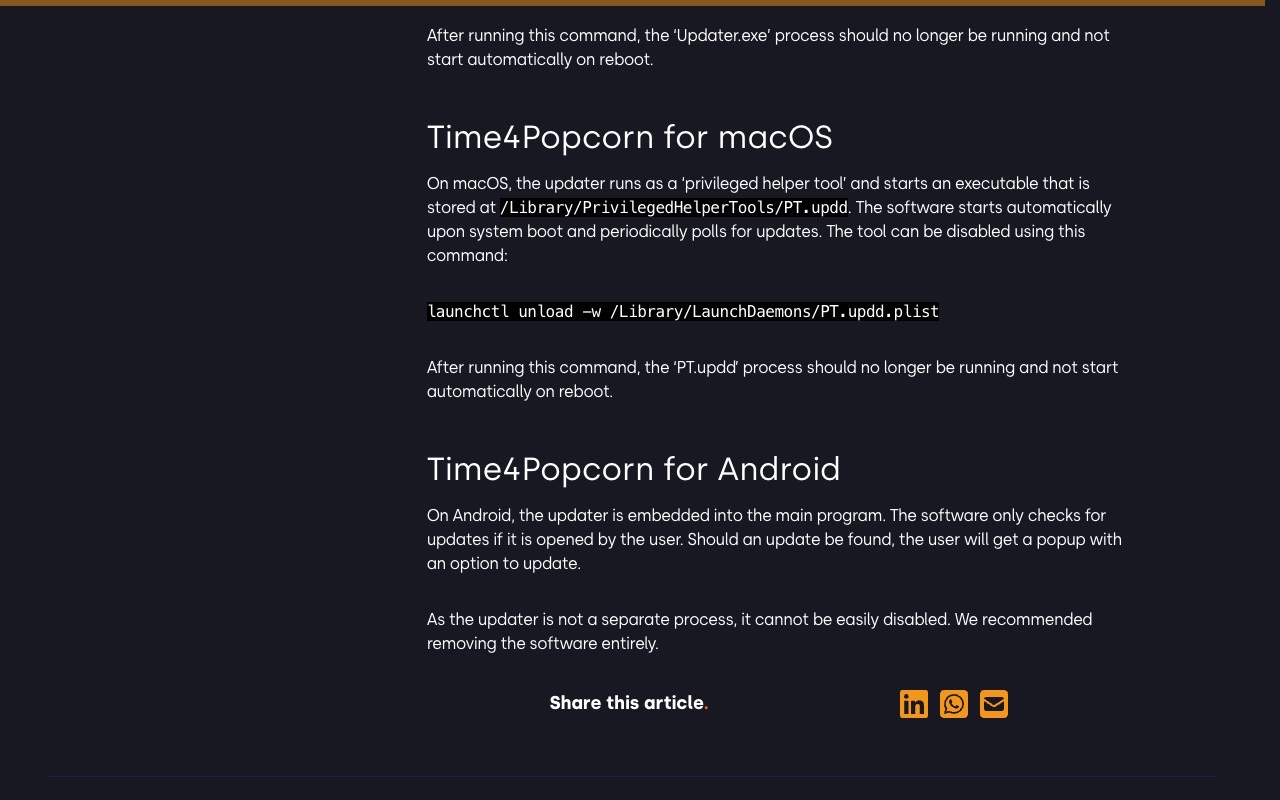
/Library/PrivilegedHelperTools/PT.updd. It starts at boot and polls for updates, whether or not the app is open. - The flaw. Eye Research reverse engineered the helper and found it needed only a JSON reply with a link to an executable. It downloaded that file over HTTP and ran it as root, with no code signing. On Windows the same design ran as SYSTEM.
- The count. Eye Research first logged about 1.7 million macOS identifiers, then found that hostname changes and randomised hardware addresses made one Mac look like several. Its revised best guess is 250,000 to 350,000 Macs. Roughly 45% of the 3.8 million identifiers it first saw were macOS, before that correction.
- The cleanup. The project's original developers are gone, so between November 2025 and March 2026 Eye Research served an update that stopped the helper with
launchctl unload -w /Library/LaunchDaemons/PT.updd.plist. It reports more than 2 million update downloads and a 98% drop in update requests by 1 March 2026. It handed the 15 domains it controlled to the nonprofit Shadowserver Foundation in late March, but some domains remain with third parties. - The app itself. Disabling the updater does not fix Popcorn Time. Eye Research says the app runs on a Chrome engine from 2014 with the sandbox disabled and loads JavaScript over HTTP from abandoned domains. Its demonstration ran a program on Windows; AppleInsider notes it was not shown on macOS.
AppleInsider adds that Eye Research did not establish that criminals exploited the updater. Eye Research's advice on the app is blunt: "our advice is simple: uninstall it."
 Source: Eye Research advisory for CVE-2026-30612, captured 29 October 2026.
At a glance
| Item | Detail |
|---|---|
| Affected software | Time4Popcorn, distributed as Popcorn Time |
| CVE | CVE-2026-30612 |
| macOS component | PT.updd privileged helper in /Library/PrivilegedHelperTools/ |
| Launch daemon | /Library/LaunchDaemons/PT.updd.plist |
| Estimated Macs exposed | 250,000 to 350,000 (Eye Research best guess) |
| Advisory published | 11 June 2026 |
| Research report published | 22 October 2026 |
| Vendor patch | None, the project is abandoned |
| Not affected | The separate popcorntime.app project that began in 2025 |
What it means for Mac users
Check your Mac even if you have not opened Popcorn Time in years. AppleInsider's steps: in Finder choose Go, then Go to Folder, enter /Library/PrivilegedHelperTools/ and look for PT.updd. A macOS update will not fix it, because the flaw sits in a third-party app.
Dragging an app to the Trash does not necessarily remove its background services, so use a cleaner that looks for leftovers. Pearcleaner lists app uninstall, orphaned file search and a services manager among its features, but its README says development has been on hold since the end of 2025, so confirm by hand that PT.updd is gone.
A connection monitor can also show what a forgotten process talks to. Little Snitch alerts you whenever an app wants to connect to the internet and its Network Monitor shows which apps connect to which servers. LuLu is a free, open-source macOS firewall. All three are listed on Mac App Index with their prices and macOS requirements.
What to watch
Eye Research could not buy every update domain, and AppleInsider notes the repair does not guarantee every vulnerable Mac received it. Any Mac that still runs PT.updd depends on those remaining domains staying out of attackers' hands. Whether anyone shows the old app's browser flaws working on macOS is the open question.
Key takeaways
- Eye Research's CVE-2026-30612 covers the Time4Popcorn updater, which ran as root on macOS and accepted unsigned code over HTTP.
- Eye Research estimates 250,000 to 350,000 Macs were exposed, down from its first count of about 1.7 million identifiers.
- No patch exists, so the fix is to uninstall the app and confirm PT.updd is gone from
/Library/PrivilegedHelperTools/. - Eye Research disabled the updater on many Macs between November 2025 and March 2026, but the app's other flaws remain.
- The newer popcorntime.app project is not covered by this research.
FAQ
Is Popcorn Time safe to use on a Mac?
No. Eye Research says disabling the updater leaves the app's other problems in place: a 2014 Chrome engine, a disabled sandbox and JavaScript loaded over HTTP from abandoned domains. Its advice is to uninstall the app.
How do I check whether my Mac has the Popcorn Time updater?
Look for a file named PT.updd in /Library/PrivilegedHelperTools/ using Finder's Go to Folder, and for /Library/LaunchDaemons/PT.updd.plist. Eye Research's advisory gives launchctl unload -w /Library/LaunchDaemons/PT.updd.plist to stop the helper, though it recommends removing the software entirely.
Does the flaw affect the newer popcorntime.app project?
No. Eye Research states that its research does not apply to the project that began using the Popcorn Time name in early 2025.
Source: Eye Research, Operation IXIM
More tools for locking down a Mac are in the Security & privacy category.