Outlook 16.115 for Mac adds OLM import and event filter
Outlook 16.115 for Mac, from Microsoft, adds OLM import for Mail and Contacts, an event-related message filter and OFT draft templates. Requires macOS 15.

Written by Mac App Index Editorial


What happened
Microsoft released Outlook 16.115 for Mac, the email and calendar app from Microsoft Corporation, on the Mac App Store on 10 November 2026. The previous App Store build, 16.114.4, listed only general quality and performance enhancements. Version 16.115 is a feature update.
Outlook 16.115 for Mac, released by Microsoft on 10 November 2026, adds OLM import for Mail and Contacts, a filter for event-related messages, OFT templates for creating drafts, and work location and working hours editing in the Calendar list and agenda views. It requires macOS 15.0 or later.
What's new in Outlook 16.115
The App Store notes list five changes under "Feature Updates".
- OLM import for Mail and Contacts. The notes say OLM Import is now supported for Mail and Contacts, and name no other data types. Microsoft added PST import to Outlook for Mac in 16.110, which the App Store version history dates 16 June, so 16.115 adds OLM import alongside it.
- Filter by event-related messages. You can filter the message list to show messages related to events.
- OFT templates for drafts. Outlook can now create a draft from an OFT template file.
- Work location and working hours in Calendar. You can see and update both from the list view and the agenda view. Microsoft's Office for Mac release notes show that 16.113, dated 16 September 2026, added Outlook Settings for managing work hours and work-location schedules on supported accounts.
- Plain-text printing of event descriptions. Printing from the list view now prints event descriptions as plain text.
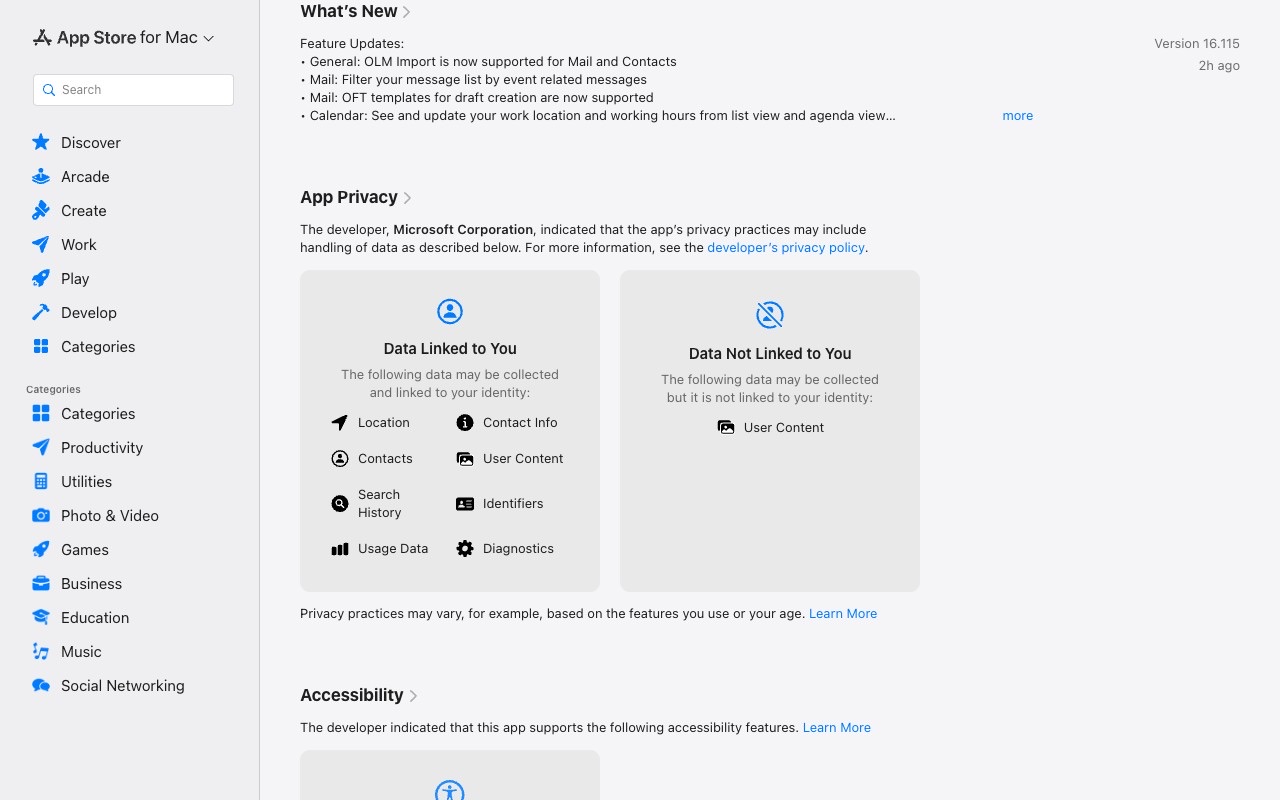 Source: Microsoft Outlook on the Mac App Store, captured 10 November 2026.
The notes are one line per feature and give no limits or file-size details. Microsoft's Office for Mac release notes had no 16.115 entry when this post was written; the newest entry was 16.114.3 of 27 October 2026. That page also says Microsoft often rolls features out over a period of time, so a listed feature may not appear in your copy straight away.
At a glance
| Item | Detail |
|---|---|
| App | Microsoft Outlook for Mac |
| Version | 16.115 |
| Release date | 10 November 2026 |
| Developer | Microsoft Corporation |
| Price | Free to download, with in-app purchases for Microsoft 365 plans; a premium subscription goes ad-free |
| macOS requirement | macOS 15.0 or later |
| Size | 1.2 GB |
| Accounts | Microsoft 365, Outlook.com, Gmail, Yahoo! Mail, iCloud, IMAP and POP |
| Where to get it | Mac App Store |
What it means for Mac users
If you keep mail or contacts in an OLM export, Outlook 16.115 gives you a way to bring both into the app; check a small import first, because the notes do not describe what is carried over. The calendar changes matter most to people on work accounts, where working hours and location now sit in the list and agenda views.
Microsoft's Outlook for Mac support page says "Support for legacy Outlook for Mac will end in October 2026." The 16.115 notes do not link OLM import to that change.
If you are weighing a different client before moving a mailbox, Spark Mail, Mimestream, Airmail and Thunderbird are the closest email alternatives, and Fantastical covers the calendar side. All of them are listed on Mac App Index with their prices and macOS requirements, and the Outlook alternatives page compares them directly.
What to watch
The open question is detail: Microsoft's release notes page should add a 16.115 entry, and it will show whether the Outlook features arrive for everyone at once or in stages, as that page says some features do.
Key takeaways
- Outlook 16.115 for Mac shipped on the Mac App Store on 10 November 2026.
- It adds OLM import for Mail and Contacts, following PST import in 16.110.
- Mail gains a filter for event-related messages and OFT templates for creating drafts.
- Calendar list and agenda views now show and edit work location and working hours.
- The App Store listing requires macOS 15.0 or later and is 1.2 GB.
FAQ
Is Outlook 16.115 a free update?
Yes. The Mac App Store lists Outlook as free with in-app purchases, and 16.115 is the current version of that listing. The listing says the app contains advertising and that a premium subscription removes it.
What macOS version does Outlook 16.115 need?
macOS 15.0 or later, according to the Mac App Store listing. The listing describes the app as built for Apple silicon.
What can Outlook 16.115 import from an OLM file?
Mail and Contacts, according to the App Store notes. The notes do not name any other data types, and Microsoft has not published further detail on the import.
Source: Microsoft Outlook on the Mac App Store
See more email and calendar apps in the Communication category.